
Once your Minecraft server is up and running, sooner or later you will want more from it. For example, you may want to give players permissions, protect builds from griefers or add new items to the game. That is what plugins and mods are for, and which of them you can install depends on the server core. In this article we cover what kinds of cores there are and how they differ, how to change the core on a server that is already running, and how to install plugins. We tested all the examples on a test server with Minecraft 26.3, which we set up following the article about a Minecraft server on a VPS.
Core, plugins and mods
The core is the server program itself, the .jar file that you start with the java -jar command. Mojang releases the official core, and the community makes its own, which are faster or have extra features. The core decides what you can add to the server at all.
Plugins run only on the server. They change the rules of the game and add commands, permissions, land protection and an economy. Players don't need to install anything, because they join with the regular game, so plugins usually don't add truly new blocks or mobs. Plugins work on cores of the Paper family, that is, on Paper, Purpur and, with some caveats, on Folia.
Mods can change the game much more deeply, all the way to new blocks, mobs and dimensions. They run on the mod loader cores Fabric, NeoForge and Forge. Some mods only need to be installed on the server, while others are needed by every player too. This is stated on the mod's page on Modrinth in the Supported environments block.
Plugins and mods are not compatible with each other. A plugin won't run on Fabric, and a mod won't run on Paper. So first decide what you need, and then choose a core.
Which core to choose
| Core | What it is | What you can add | When to choose it |
|---|---|---|---|
| Vanilla | The official server from Mojang | Nothing | You want the game without changes |
| Paper | A fast server based on the official one | Plugins | A regular server for friends or a community |
| Purpur | A server based on Paper with many extra settings | Plugins for Bukkit, Spigot and Paper | You want to fine-tune the game mechanics |
| Folia | A version of Paper that processes different parts of the world in different threads | Only plugins that support Folia | A very large number of players spread across the world |
| Fabric | A lightweight mod loader | Mods for Fabric | Mods, including optimizations |
| NeoForge | A mod loader | Mods for NeoForge | Large modpacks |
| Forge | The classic mod loader | Mods for Forge | A modpack that exists only for Forge |
| Velocity | A proxy that joins several servers into one network | Plugins for Velocity | Several servers with transfers between them |
At the time of testing, builds for Minecraft 26.3 existed for all the cores in the table, but for Forge only builds without the "recommended" label. If you don't know what to choose, install Paper. The Folia developers themselves write that most servers don't need it and that it breaks most public plugins.
How to change the core
Switching between cores of the Paper family is easy, because the world and plugins stay the same. We moved the test server from Paper to Purpur, and it started with the same world and all three plugins. Then we switched back to Paper the same way.
Stop the server and make a copy of the world.
bashsystemctl stop minecraft cp -a /opt/minecraft/world /root/world-backupDownload the new core into the server folder. For Purpur, the latest build of the version you need can be downloaded from a direct link.
bashcd /opt/minecraft curl -fsSL -o purpur.jar https://api.purpurmc.org/v2/purpur/26.3/latest/download chown minecraft:minecraft purpur.jarIn the start script, replace the name of the core file.
bashsed -i 's/-jar paper.jar/-jar purpur.jar/' /opt/minecraft/start.shStart the server and check in the log that the new core has loaded.
bashsystemctl start minecraft grep bootstrap /opt/minecraft/logs/latest.logThe Loading Purpur line will show the core version. A
purpur.ymlfile with extra settings will appear next toserver.properties.
This won't work with Fabric, NeoForge and Forge, because plugins don't run there. It is better to install a server on a mod loader in a separate folder. For Fabric there is a ready-made server file on the fabricmc.net/use/server page. We tested it on Minecraft 26.3. On the first start it downloaded the game and the loader by itself and created the mods folder, where you put mods. Most Fabric mods also need the Fabric API mod, which goes into mods as well.
Where to get plugins
Download plugins only from well-known sites.
- Modrinth – a large catalog of plugins and mods with a handy filter by game version and core.
- Hangar – a catalog of plugins on the PaperMC site.
- SpigotMC – a catalog of plugins on the SpigotMC site.
On the plugin's page, check that it supports your Minecraft version and your core. A plugin for an old version may fail to start or may work with errors.
Don't download plugins from random sites
A plugin is a program that runs on your server with the rights of the minecraft user. A plugin from an unverified source may contain malicious code and gain access to all the files of your Minecraft server.
How to install a plugin
Installing a plugin on Paper just means putting a .jar file in the plugins folder. We installed three popular plugins on the test server. LuckPerms manages player permissions, WorldEdit helps with building, and Chunky pre-generates the world around spawn.
Copy the link to the file of the version you need from the plugin's page and download it into the
pluginsfolder.bashcd /opt/minecraft/plugins curl -fsSL -O https://cdn.modrinth.com/data/Vebnzrzj/versions/b0mk8uS6/LuckPerms-Bukkit-5.5.71.jar chown minecraft:minecraft *.jarRestart the server.
bashsystemctl restart minecraftOpen the server console with the command
su - minecraft -c "screen -r minecraft"and enterplugins. The server will show the list of loaded plugins.
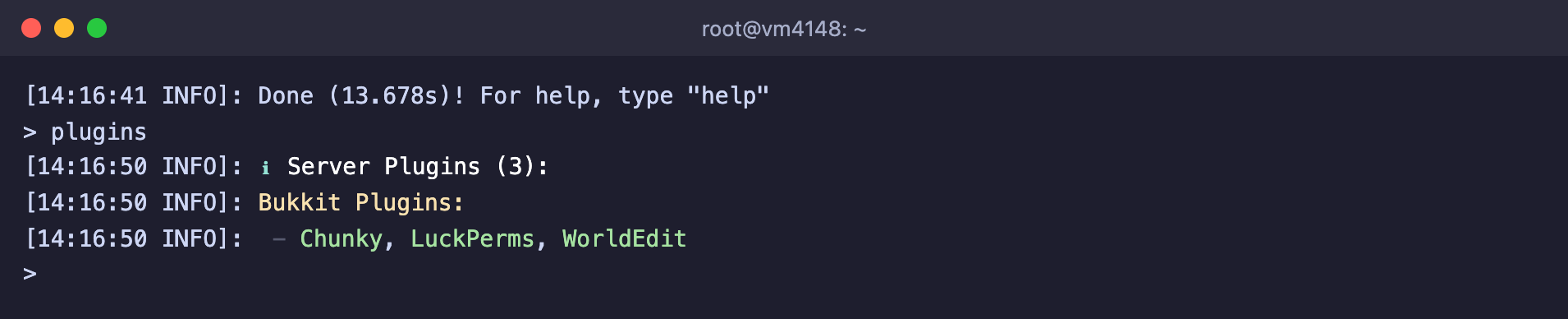
All three plugins are loaded
On the first start a plugin usually creates its own settings folder inside plugins, for example plugins/LuckPerms. You change the settings in the files of this folder and then restart the server.
Plugin examples
LuckPerms gives permissions to groups of players. Below we created a group of builders, allowed it all WorldEdit commands and added a player to it.
lp creategroup builders
lp group builders permission set worldedit.* true
lp user Steve parent add builders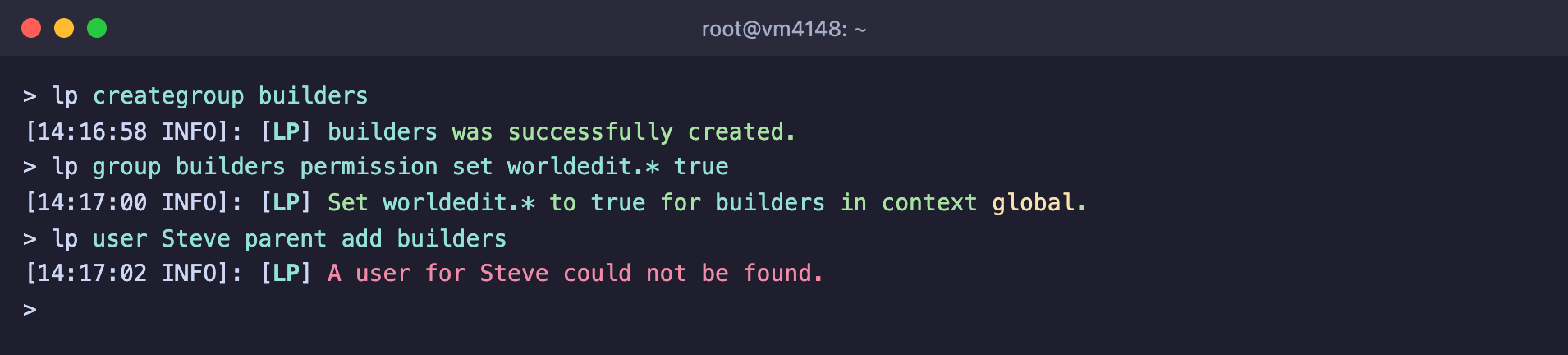
The group is created, but LuckPerms doesn't know the player yet
Note the last line. LuckPerms did not find a player who has never joined the server. So add a player to a group after their first join.
Chunky pre-generates chunks of the world so the server doesn't spend resources on it when players scatter in different directions. Set the radius in blocks and start the task.
chunky radius 300
chunky start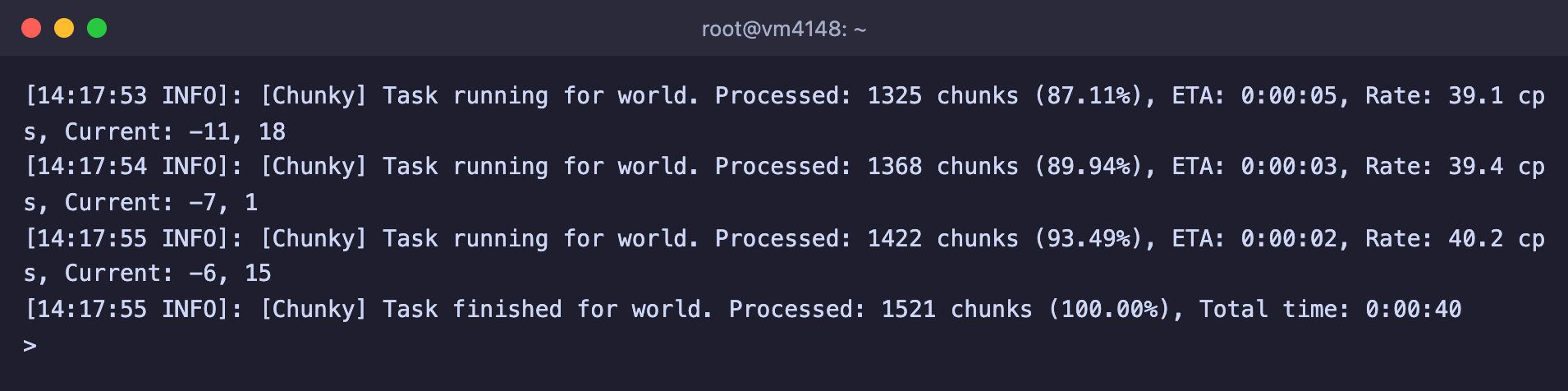
The world within a 300-block radius was generated in 40 seconds
On our server, the world within a 300-block radius took 1,521 chunks and was ready in 40 seconds, and the world folder grew to 30 MB. For a large radius the task can run for hours, so start it when there are few players on the server.
How to update or remove a plugin
- Update. Stop the server, delete the old plugin file from
plugins, put the new one in and start the server. Don't touch the plugin's settings folder. - Remove. Stop the server and delete the plugin file. If you no longer need the plugin's settings, delete its folder too.
Before updating the core to a new Minecraft version, check that all your plugins already support it.
Frequently asked questions
does not contain a paper-plugin.yml or plugin.yml! Could not determine plugin type
You put a mod in the plugins folder instead of a plugin. We got this error when we put the Lithium mod for Fabric there. Mods work only on Fabric, NeoForge or Forge. Delete the file from plugins or find a plugin with similar features.

Paper can't load a mod as a plugin
You are running an unsupported server version!
The plugin is not built for this Minecraft version. We saw this message with EssentialsX 2.22.0, which officially supports versions up to 26.1.2, on a 26.3 server. The plugin did start, but it isn't guaranteed to work without errors. Look for a version of the plugin for your game version or wait for it to be released.
A user for … could not be found
LuckPerms doesn't know this player yet. Ask the player to join the server, and then repeat the command.
The plugin works on Paper but not on Folia
Folia processes the world in several threads, and regular plugins aren't ready for that. Only plugins whose description states Folia support work on Folia. If there are no plugins you need for Folia, stay on Paper.
Our resources
Telegram channel: https://t.me/f3cloud_news
F3 Cloud: https://f3cloud.com