
DeepSeek R1 is an open language model that you can run on your own server. Your conversations then never leave the server, the answers do not depend on how busy someone else's servers are, and you can use the model with no limit on the number of requests. The most convenient way to run it is with Ollama, a program that downloads models and gives access to them from the terminal and over an API. In this article we will work out what exactly you are running, how much memory it needs and how to avoid a mistake when choosing a server, and then install everything step by step. We checked the commands and the speed measurements on our DE-RZ9-4 server with Debian 12, and the Ollama version at the time of testing was 0.40.7.
What actually runs on the server
The full DeepSeek R1 model is huge. It has 671 billion parameters and even in compressed form takes up about 404 GB, so it will not fit on an ordinary VPS. What Ollama offers under the names deepseek-r1:1.5b, 7b, 14b and so on are distilled models. Here is how they were made. The large DeepSeek R1 solved a great many tasks, and smaller models built on the open Qwen and Llama foundations were trained to repeat its reasoning. As a result they take on the manner of the large model but remain tens and hundreds of times more compact. For example, the 8b model is built on Qwen3 8B and trained on the updated version DeepSeek R1-0528.
All of these models are reasoning models. Before giving an answer they write out their train of thought, and in the terminal this block begins with the word Thinking.... This makes answers to difficult questions more accurate but also longer, because the model has to generate more text. The DeepSeek R1 weights are distributed under the MIT licence and are suitable for commercial projects, while the models based on Llama are additionally covered by the Llama licence.
DeepSeek also has newer models, such as DeepSeek V3.1 and V4. However, V3.1 exists only in the full 671B size, and in Ollama V4 is available only as a cloud model, so the R1 line is what remains for running on your own server.
Why the model needs memory, not a graphics card
A language model is above all a huge set of numbers called weights. To generate each next word, or more precisely a piece of a word called a token, the processor has to go through all of the model's weights. Two important conclusions follow from this. First, the whole model must fit entirely in RAM, otherwise the system will start swapping it in from disk and the speed will drop many times over. Second, on a server without a graphics card the response speed depends above all on how fast the processor can read the weights from memory, so a smaller model answers noticeably faster than a large one.
By default, models in Ollama are compressed to roughly four to five bits per parameter, which is where their sizes come from. A model with 8 billion parameters takes up about 5 GB, and one with 14 billion about 9 GB. But you need more memory than the file weighs. The model needs room for the conversation context, and the system and Ollama itself need memory too. That is why it is worth choosing a server with a margin of a few gigabytes above the size of the model.
We checked in practice what happens without such a margin. On a test server with 1 GB of memory and a swap file, the smallest model, 1.5b, which weighs 1.1 GB, downloaded without any problems, but after the question “How much is 17 times 23?” it managed to print only Thinking... and one word in 8 minutes. All of the memory and most of the swap were in use, and the server practically came to a halt.
On the DE-RZ9-4 server with 4 cores and 8 GB of memory, the picture is completely different. We asked both models the same question and looked at the generation speed that Ollama shows with the --verbose option. The 8b model took up 5.9 GB in memory and wrote about 5 tokens per second. It correctly answered “391”, but first it reasoned for a long time, and the whole answer took 1 minute 22 seconds. The 1.5b model ran more than four times faster, at about 22 tokens per second, and also gave the right answer, in 34 seconds. However, it ignored the request to answer briefly, wrote out three ways of multiplying and mixed English words into its Russian answer. This example shows well what size costs. The smaller model is faster, but it follows instructions noticeably worse and mixes up languages more often.
Which model and server to choose
The model sizes are taken from the Ollama catalogue, and the plans are chosen so that there is memory to spare. Our VPS have no graphics cards, and all models run on the processor.
| Model | Size | Base | Plan |
|---|---|---|---|
deepseek-r1:1.5b | 1.1 GB | Qwen 2.5 | DE-RZ9-2, 2 vCPU and 4 GB |
deepseek-r1:7b | 4.7 GB | Qwen 2.5 | DE-RZ9-4, 4 vCPU and 8 GB |
deepseek-r1:8b | 5.2 GB | Qwen3, version R1-0528 | DE-RZ9-4, 4 vCPU and 8 GB |
deepseek-r1:14b | 9 GB | Qwen 2.5 | DE-RZ9-8, 8 vCPU and 16 GB |
deepseek-r1:32b | 20 GB | Qwen 2.5 | DE-RZ9-16, 16 vCPU and 32 GB |
deepseek-r1:70b | 43 GB | Llama 3.3 | needs a dedicated server |
deepseek-r1:671b | 404 GB | full model | needs a dedicated server |
For a first try, 1.5b is enough, but in our Russian-language test it was rather weak. A sensible choice for most tasks is the 8b model. Ollama downloads it by default if you do not specify a size, and it is trained on the newest version, R1-0528. The 14b and 32b models are larger and usually cope better with difficult tasks, but they answer more slowly on a processor.
Not sure whether the plan is enough
Start with a smaller plan and the 8b model. If the answers suit you in quality but not in speed, you can move to a higher plan, and the server's data and IP address will be kept. You cannot move to a lower plan later, because the server's disk cannot be reduced.
What you need
- A server with Debian 12 or Ubuntu 24.04 and the amount of memory given in the table above. If you do not have a server yet, order one using the guide.
- Free disk space. Ollama itself takes up about 2 GB, plus the size of the model.
- An SSH connection, for example via Termius. Commands are run as
root.
Step 1. Install Ollama
Ollama is installed with the official script in a single command.
# Install Ollama with the official script
curl -fsSL https://ollama.com/install.sh | sh
The script will download the program, create a separate user and service for it and start it. At the end it will report that the API is available at 127.0.0.1:11434 and warn that no graphics card was found. This is normal on a VPS, and the models will run on the processor.
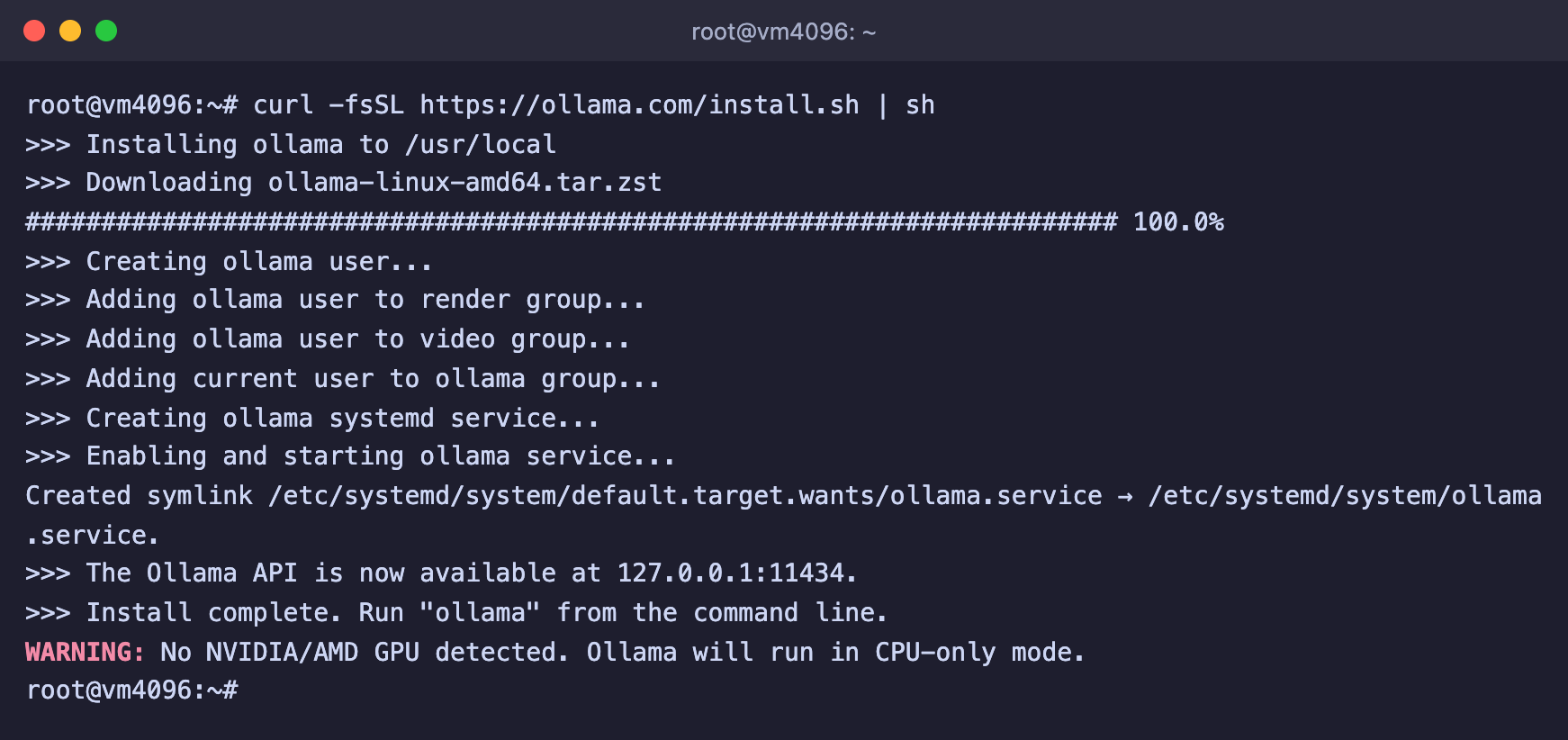
Ollama is installed
Step 2. Download the model
Specify the model you chose from the table. For example, for 8b the command looks like this.
# Download the DeepSeek R1 8B model
ollama pull deepseek-r1:8b
Ollama will show the download progress and print success at the end. On our server the 1.5b model downloaded at about 15 MB/s.
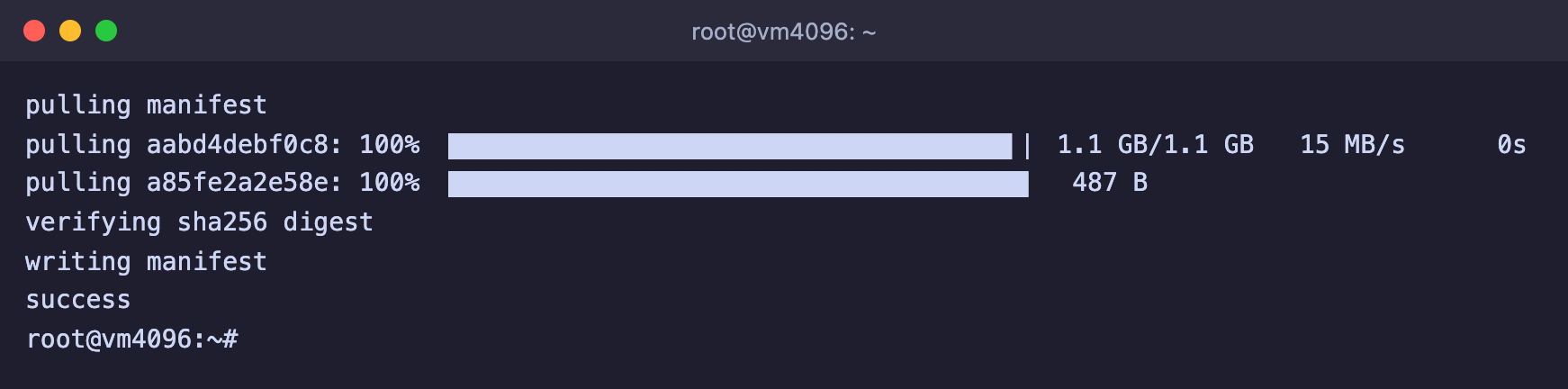
The model is downloaded
Step 3. Ask a question
Start the model in chat mode.
ollama run deepseek-r1:8bAn input line will appear. Type your question and press Enter. First the model will print a block of reasoning after the word Thinking..., and then the answer itself. To leave the chat, type /bye.
If you add the --verbose option, Ollama will show the time and speed after the answer. The main line here is eval rate, the number of tokens the model produces per second.
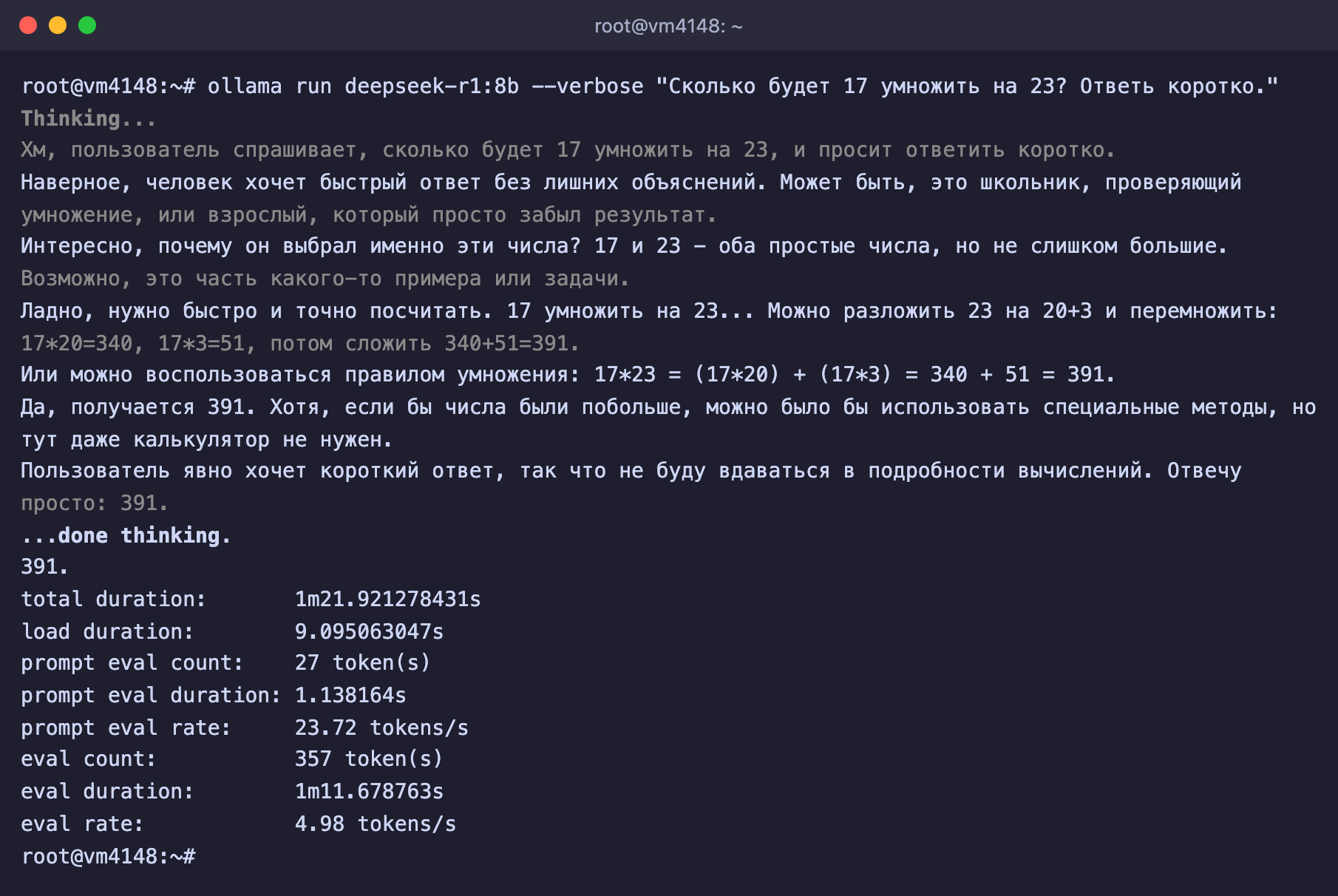
The 8b model's answer on DE-RZ9-4
You can also ask a single question straight away, without a chat. This is handy for scripts.
ollama run deepseek-r1:8b "Explain in simple words what DNS is"Working with the API
After installation Ollama runs as a service and accepts API requests on the server itself. There is no need to start ollama serve by hand. This way you can connect the model to your own bot, website or the OpenClaw agent.
# Request to the model through the Ollama API
curl http://127.0.0.1:11434/api/chat -d '{
  "model": "deepseek-r1:8b",
  "messages": [{"role": "user", "content": "Hello!"}],
  "stream": false
}'
To reach the API from your own computer without opening it to the internet, use an SSH tunnel. Run the command on your own computer and keep the window open, after which the API will be available to you at http://127.0.0.1:11434.
# Forward the Ollama port from the server to your computer
ssh -N -L 11434:127.0.0.1:11434 root@SERVER_IP
Do not open port 11434 to the internet
The Ollama API has no password. Anyone who reaches it will be able to use your server, download models onto it and take up all of its memory.
Open WebUI web interface
Chatting with the model in the terminal is not very convenient, so people usually add a web interface to Ollama. The most popular option is Open WebUI, a familiar chat in the browser that looks like ChatGPT. It connects to Ollama on the same server and shows the models you have downloaded into it. We install the lightweight slim image. It weighs about 200 MB instead of 1.6 GB for the full one, because it has no built-in document processing or voice features, and an ordinary chat does not need them.
If Docker is not on the server yet, install it with the official script.
curl -fsSL https://get.docker.com | shStart Open WebUI.
docker run -d --network=host \
  -e HOST=127.0.0.1 \
  -e OLLAMA_BASE_URL=http://127.0.0.1:11434 \
  -e WEBUI_SECRET_KEY=$(openssl rand -hex 32) \
  -v open-webui:/app/backend/data \
  --name open-webui --restart always \
  ghcr.io/open-webui/open-webui:slim
The HOST=127.0.0.1 parameter keeps the interface available only on the server itself, and OLLAMA_BASE_URL tells it where Ollama is running. On our test server Open WebUI started without errors and took up about 320 MB of memory, so add these few hundred megabytes to the memory the model needs.
Open the interface from your own computer through an SSH tunnel. Run the command on your own computer and keep the window open.
# Forward the Open WebUI port from the server to your computer
ssh -N -L 8080:127.0.0.1:8080 root@SERVER_IP
Open http://localhost:8080 in your browser and click Get started (Давайте начнём). The form for creating the first account will open.
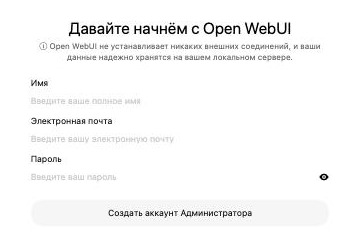
The first account in Open WebUI
The first account becomes the administrator
It manages users and all Open WebUI settings. Create it right after the launch and choose a strong password.
After you log in, the chat opens. Open WebUI finds the models downloaded into Ollama by itself, and you can choose the model you need right in the input line.

Choosing a model in Open WebUI
Open WebUI collapses the model's reasoning into a single line that you can expand with a click, and shows the finished answer below it.
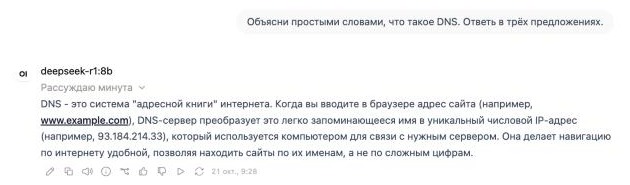
DeepSeek 8b's answer in Open WebUI
The model needs almost the whole server
On our DE-RZ9-4 other programs were running at the same time, the 8 GB of memory was no longer enough, part of it went into swap, and the answer in Open WebUI took more than two minutes. If you install the 8b model, do not run anything heavy on the same server.
Useful commands
# Downloaded models
ollama ls

# Models currently loaded in memory
ollama ps

# Unload a model from memory
ollama stop deepseek-r1:8b

# Delete a model from disk
ollama rm deepseek-r1:1.5b

# Status of the Ollama service
systemctl status ollama
Frequently asked questions
The model answers very slowly
Check whether there is enough memory with the free -h command. If swap is in use (the Swap line), the model does not fit in memory. Take a smaller model or move to a higher plan. If memory is fine, only a faster processor with more cores or a smaller model will speed up the answers.
The model reasons for a very long time and produces long text
This is how reasoning models work. Ask for a short answer in your question. If you do not need the reasoning, for simple tasks you can use an ordinary model without the Thinking... block.
How to remove Ollama completely
Delete the models with the ollama rm command, then stop the service and remove the program.
systemctl disable --now ollama
rm -rf /usr/local/lib/ollama /usr/local/bin/ollama /usr/share/ollama
Our resources
Telegram channel: https://t.me/f3cloud_news
F3 Cloud: https://f3cloud.com