
While a bot runs on your home computer, it only answers when the computer is turned on. On a VPS the bot works around the clock, survives reboots and does not depend on your internet connection. In this article we will create a bot in Telegram, run it on a server with Python and the aiogram library, set up autostart with systemd and go through the errors you are most likely to meet. As an example we will use a simple bot that says hello and repeats your messages, and later you can put your own code in its place. We tested every step on a test server with Debian 12, Python 3.11 and aiogram 3.31.
How a bot receives messages
A Telegram bot is an ordinary program that talks to Telegram servers through the Bot API. A user writes to the bot, the message reaches Telegram servers and waits there until the bot program picks it up. According to the Telegram documentation, there are two ways to receive such messages, and you can use only one of them at a time. The first one is called polling. The bot itself keeps asking Telegram whether there are new messages. The second one, webhook, works the other way around. Telegram itself sends every message to the address of your server, and this requires a domain with HTTPS.
Polling is the easiest option for a bot on a VPS. It needs no domain, no certificate and no open ports, because the connection is always started by the bot. On our test server the UFW firewall was enabled without a single rule for the bot, and the bot worked. Messages that arrived while the bot was switched off are stored by Telegram for up to 24 hours, so after a short restart the bot will receive them.
Access to the bot is given by the token, a long string issued by BotFather. Whoever knows the token has full control of the bot. That is why the token is not written directly into the code and is not published together with it on GitHub. It is kept in a separate file that only root can read.
What you will need
- A server with Debian 12 or Ubuntu 24.04. The smallest plan is enough for a simple bot, for example DE-Promo. If you do not have a server yet, order one by following the guide.
- An SSH connection, for example through Termius. The commands are run as
root. - A Telegram account to create the bot.
Step 1. Create a bot in BotFather
- Open the @BotFather bot in Telegram and send it the
/newbotcommand. - Enter the name of the bot. Users will see it, and it can be anything.
- Enter the username of the bot. It must end with
bot, for examplemy_shop_bot. - BotFather will send you a link to the bot and the token under the line Use this token to access the HTTP API. Copy the token and do not show it to anyone.
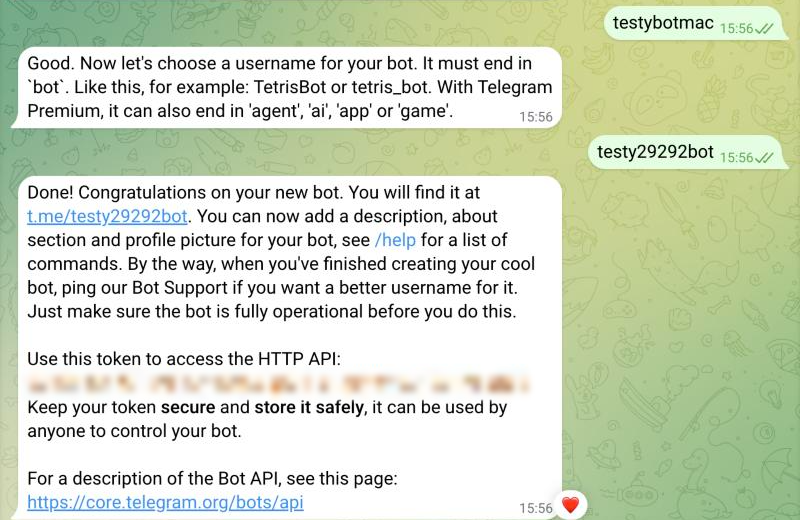
The bot is created, the token is hidden
If the token has fallen into the wrong hands
Revoke it with the /revoke command in BotFather, then replace the token on the server in the /etc/tgbot.env file and restart the bot.
Step 2. Prepare the server
Create a separate user for the bot. If there is a bug in the bot code that lets someone run foreign commands, an attacker will get the rights of this user only, not of root.
useradd -r -m -d /opt/tgbot -s /bin/bash tgbot
apt install -y python3-venv
The python3-venv package is needed for a virtual environment, a separate folder with libraries just for this bot. In our Debian 12 image it is not installed by default.
Switch to the bot user, create the environment and install aiogram.
su - tgbot
python3 -m venv venv
venv/bin/pip install aiogram
At the end of the installation you will see the line Successfully installed with a list of packages, including aiogram.
Step 3. Write the bot code
Create a file for the code.
nano bot.pyPaste the example below into it and save with Ctrl + O, then Enter, and exit with Ctrl + X.
import asyncio
import logging
import os

from aiogram import Bot, Dispatcher
from aiogram.filters import CommandStart
from aiogram.types import Message

dp = Dispatcher()


@dp.message(CommandStart())
async def start(message: Message):
    # reply to the /start command
    await message.answer(f"Hi, {message.from_user.first_name}! I run on a VPS. Write something and I will repeat it.")


@dp.message()
async def echo(message: Message):
    # repeat any other message
    await message.send_copy(chat_id=message.chat.id)


async def main():
    bot = Bot(token=os.environ["BOT_TOKEN"])
    await dp.start_polling(bot)


if __name__ == "__main__":
    logging.basicConfig(level=logging.INFO)
    asyncio.run(main())
Notice that there is no token in the code. The bot takes it from the BOT_TOKEN environment variable.
Step 4. Test the bot manually
Before you set up autostart, make sure the bot works. The read -s command will ask for the token and will not show it on the screen, so it will not stay in the command history. Paste the token and press Enter.
read -s -p "Token: " BOT_TOKEN; export BOT_TOKEN
venv/bin/python bot.py
If everything is fine, you will see the lines Start polling and Run polling for bot with the address of your bot.

The bot is running and has handled two messages
Open the bot in Telegram using the link from BotFather, send it /start and then any message.
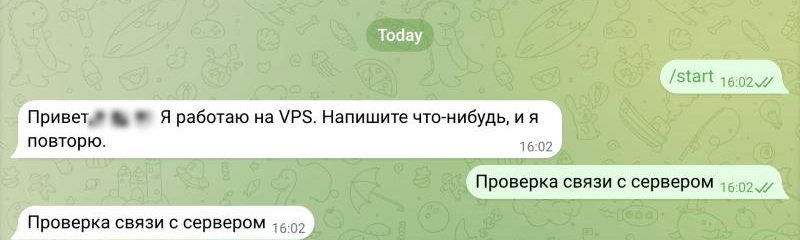
The bot replies to /start and repeats messages
Stop the bot with Ctrl + C and return to root with the exit command.
Step 5. Set up autostart
Right now the bot works only while the terminal is open. Let us turn it into a systemd service, so that it starts together with the server and comes back up after failures. You can read more about services in the article about systemd.
First, save the token to a file that only root can read. Replace YOUR_TOKEN with the token from BotFather.
echo "BOT_TOKEN=YOUR_TOKEN" > /etc/tgbot.env
chmod 600 /etc/tgbot.env
Then create the service.
nano /etc/systemd/system/tgbot.service[Unit]
Description=Telegram bot
After=network-online.target
Wants=network-online.target
[Service]
User=tgbot
WorkingDirectory=/opt/tgbot
EnvironmentFile=/etc/tgbot.env
ExecStart=/opt/tgbot/venv/bin/python bot.py
Restart=always
RestartSec=5
[Install]
WantedBy=multi-user.targetThe EnvironmentFile line passes the token from the file to the bot. systemd reads this file as root before the bot starts, so the tgbot user itself does not need access to it.
Enable autostart and start the bot.
systemctl daemon-reload
systemctl enable --now tgbot
systemctl status tgbot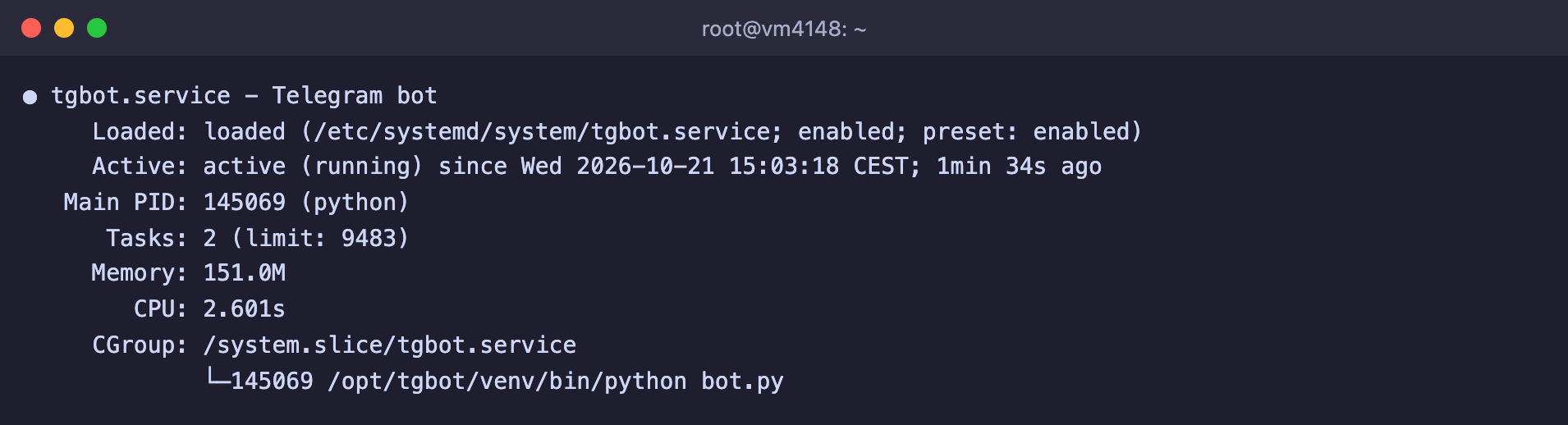
The bot is running as a service
On our server the service with this bot used about 150 MB of memory according to systemctl status.
How to update the bot and view logs
- You changed the code. Edit
/opt/tgbot/bot.pyand restart the service withsystemctl restart tgbot. - You added a library. Install it into the bot's environment with
su - tgbot -c "venv/bin/pip install name"and restart the service. - Logs. Everything the bot prints to the console goes to the journal.
journalctl -u tgbot -n 50shows the last lines, and you can follow it in real time withjournalctl -u tgbot -f. You can read more about the journal in the article about Linux logs.
Frequently asked questions
The virtual environment was not created successfully because ensurepip is not available
The python3-venv package is not installed. We got this error on a clean Debian 12. Install the package with apt install -y python3-venv, delete the failed folder with rm -rf venv and create the environment again.
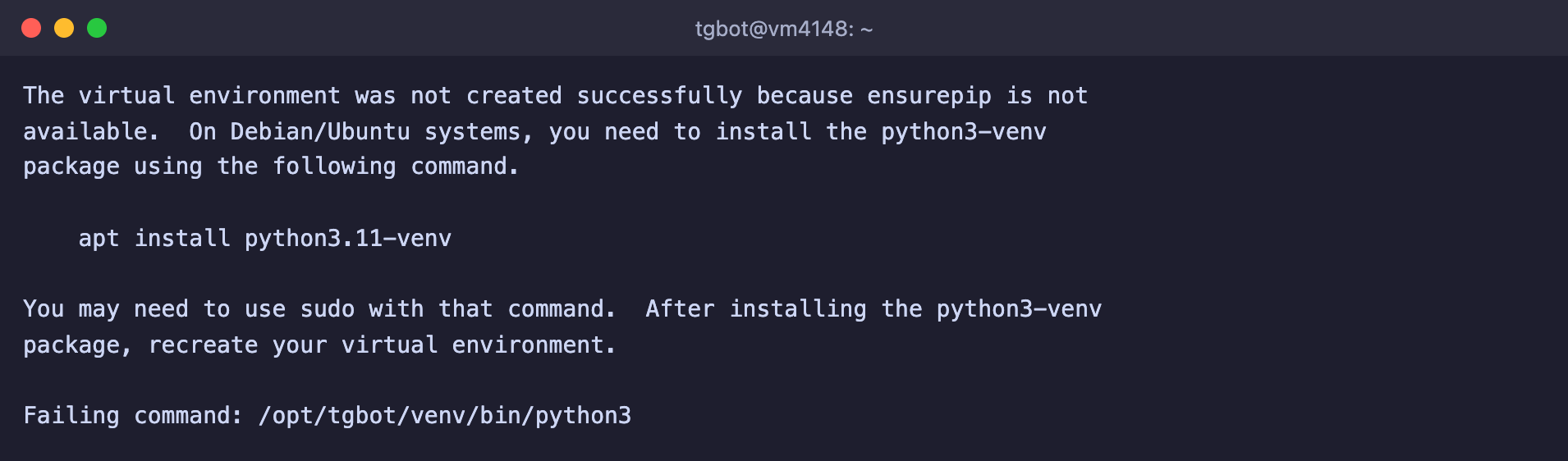
Python tells you which package to install
TelegramUnauthorizedError: Telegram server says - Unauthorized
Telegram did not accept the token. Most likely it was copied incompletely or with an extra space, or it was revoked with the /revoke command. Check the line in /etc/tgbot.env or get a new token from BotFather.

This is how Telegram responds to a wrong token
TelegramConflictError: terminated by other getUpdates request
Two copies of the bot are running with the same token at the same time. We got this error when we started the bot manually while the service was running. Usually the second copy is left in another terminal window, in screen or on another server. Stop the extra copy. Once it was stopped, the service on our server reconnected on its own.

Telegram requires that only one copy of the bot is running
ModuleNotFoundError: No module named 'aiogram'
The bot was started with the system Python instead of the Python from the environment. We got this error when we started the bot with python3 bot.py. Start it with venv/bin/python bot.py, and in the service specify the full path /opt/tgbot/venv/bin/python.
The bot does not respond
- Check that the service is running with
systemctl status tgbot. - Look at the last lines of the journal with
journalctl -u tgbot -n 50. The error that stopped the bot will be there. - Make sure that a second copy of the bot with the same token is not running.
Our resources
Telegram channel: https://t.me/f3cloud_news
F3 Cloud: https://f3cloud.com