> The full list of articles is in [llms.txt](https://docs.f3cloud.com/llms.txt). Every page has a Markdown version: add .md to its address. This page as Markdown: [https://docs.f3cloud.com/en/client-area/reset-root-password.md](https://docs.f3cloud.com/en/client-area/reset-root-password.md).
# Changing the virtual server password
How to change the root password of an F3 Cloud VPS in the client area without reinstalling the system. A strong password generator, what changes for SSH, SFTP and the console, and what to do if the password does not work.
If the server password has been lost or may have fallen into the wrong hands, it is worth changing it. You can do this in the client area in a minute. Files and settings on the server stay in place, and the server does not even reboot.
***
## 1. Select the server in the list
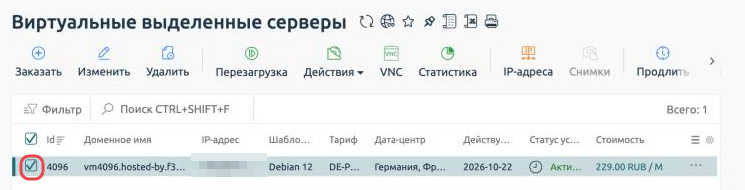
Log in to the [client area](https://my.f3cloud.com/) and open the server list in the **Products/Services** (Товары/Услуги) section. Tick the server you need to the left of its number, and the buttons on the toolbar above the list become active.
The server is selected and the control buttons are active
***
## 2. Open «Change password»
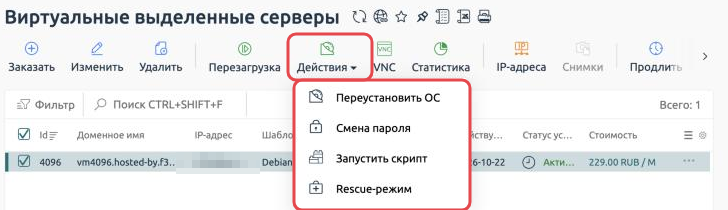
Click Actions (Действия) on the toolbar above the list and choose **Change password** (Смена пароля).
Changing the password is in the Actions menu
***
## 3. Set a new password
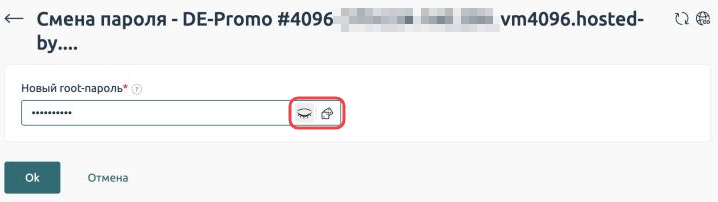
The form has just one field, **New root password** (Новый root-пароль). Billing accepts a password of **6 characters** or more, but we recommend making it longer, from 12 characters, with upper and lower case letters and digits.
* The eye button shows the password you have typed so you can check it before saving.
* The button next to it generates a strong password for you.
Buttons for showing and generating a password
Click Ok. The new password starts working within a few seconds, and the old one stops working straight away.
> **Update the password in all your apps.**
>
> The root password is used to log in over SSH, over SFTP and in the VNC console. After changing it, update it wherever it was saved, for example in Termius or FileZilla.
> **The details in «Instructions» do not change.**
>
> The Instructions (Инструкция) button shows the password issued when the server was ordered. After the change it becomes outdated, so keep the new password somewhere safe, for example in a password manager.
***
## If something went wrong
The new password does not work over SSH
If you have disabled password login and use [SSH keys](https://docs.f3cloud.com/en/vps/security/ssh-keys.md), the new password will not work over SSH, and that is how it should be. Log in with your key, and the password will come in handy for the VNC console.
If you have not disabled password login, check the keyboard layout and Caps Lock. Then try logging in to the console with the VNC button, the login there is `root`.
The message «The request has already been sent. Try again in a minute»
The password can be changed no more than once a minute. If you have just changed it, it has already been changed, so try logging in with the new password. If not, wait a minute and try again.
The message «The action failed»
This means the server management system could not change the password. Billing creates a support task automatically, and we will get in touch with you. There is no need to repeat the change in the meantime.
***
## Our resources
**Telegram channel:** [https://t.me/f3cloud_news](https://t.me/f3cloud_news)\
**F3 Cloud:** [https://f3cloud.com](https://f3cloud.com/en)